CodeGraph: Turning Python Code into a Searchable Graph with FalkorDB
Motivation Behind Building This
One of the things I realized while working with codebases was that finding a function isn't necessarily the hard part. Understanding how that function connects to everything else can be a completely different challenge.
For example, let's say you're exploring an unfamiliar repository and come across a function. You might understand what that particular function does, but what if you want to know which other functions call it, or what parts of the codebase might be affected if you change it?
You could manually go through the files and trace these relationships, but that becomes increasingly difficult as the codebase grows.
This made me wonder: what if we could represent these relationships as a graph and actually explore them visually, rather than having to figure everything out manually?
That's essentially what motivated me to build CodeGraph.
I thought of including this section because, irrespective of the outcome of the hackathon, in the end, I got to build something, write a blog post detailing my journey, and gain lots of experience building with FalkorDB.
With that, let's move on to the actual technical deep dive.
What Is CodeGraph?
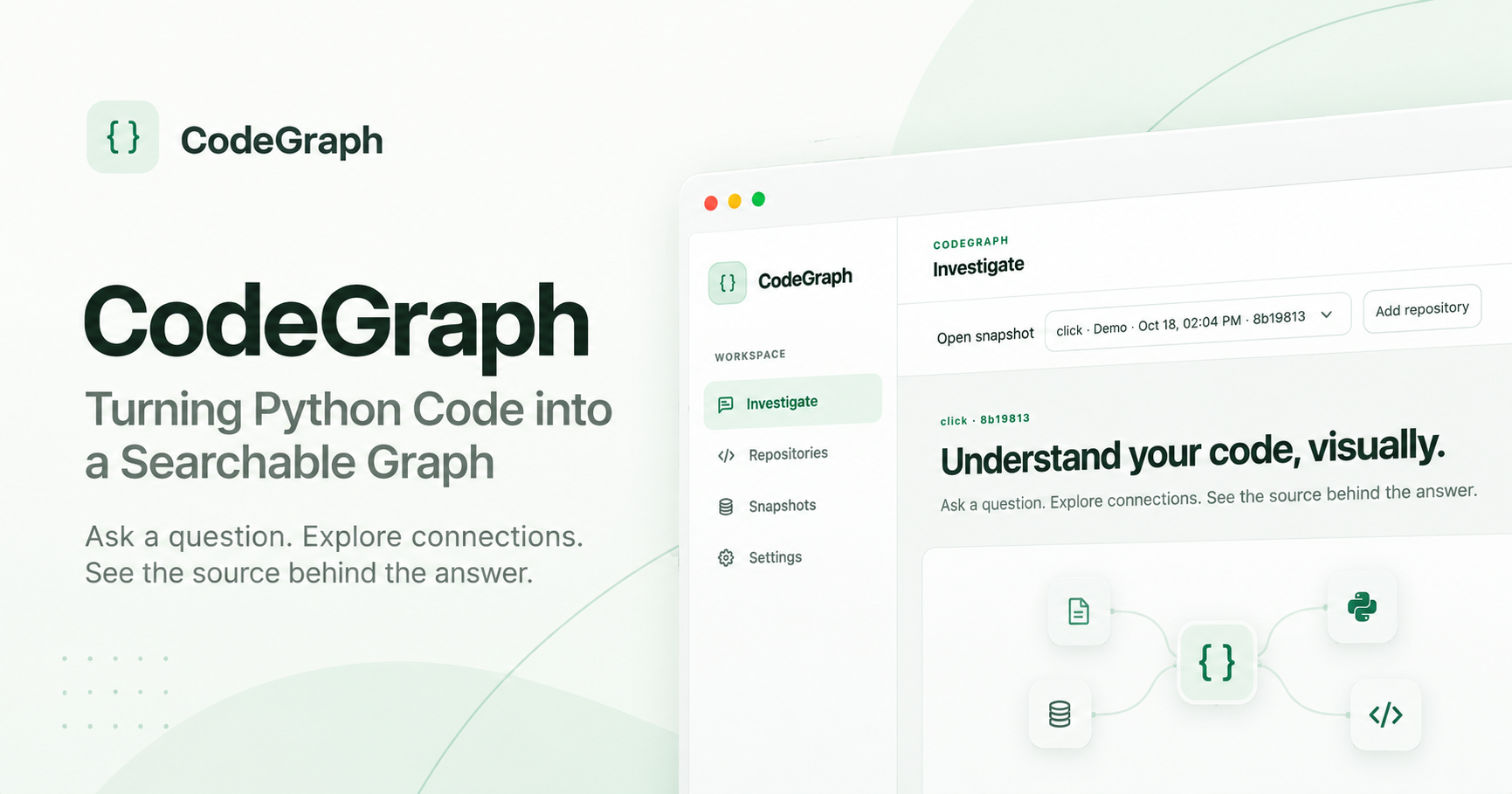
CodeGraph is a project I built that allows developers to turn a Python codebase into a searchable graph of code relationships. (I'll mention why only Python and not other languages in the limitations section.)
What Can You Do with CodeGraph?
Visualize code: See functions, classes, and their relationships as an interactive graph.
Ask questions in English: Find how functions connect, what calls what, and where something is defined.
Show proof: Click a connection and see the actual source code supporting it.
Rather than using an LLM to guess relationships, it builds relationships from code analysis, stores them in a graph, and distinguishes confirmed, possible, and unresolved connections.
More on how exactly it works down below :)
Architecture
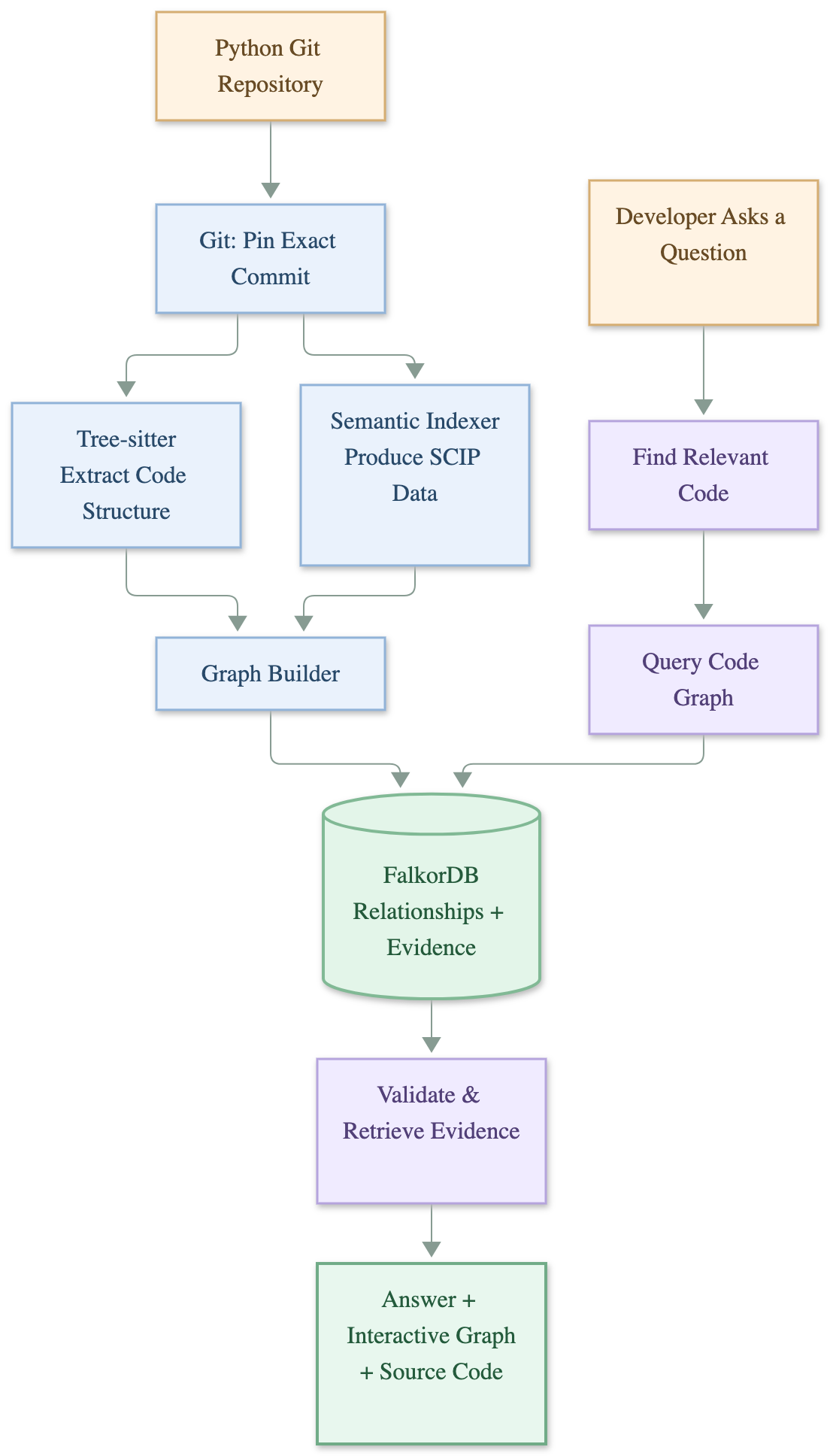
There are mainly 7 components in CodeGraph.
1. Git
Supplies the exact commit to be analyzed.
2. Tree-sitter
This is one of the core components of how the code is broken down. Since building relationships accurately is one of the core ideas of CodeGraph, it was important to get this right.
Tree-sitter is an open-source parsing library that ingests source code and turns it into a tree (similar to an Abstract Syntax Tree, or AST).
In simple words, its job is to break Python code into meaningful pieces.
For example, consider payment.py and checkout.py.
File 1 — payment.py
def pay(amount):
    print(amount)
File 2 — checkout.py
from payment import pay

def checkout():
    pay(100)
Tree-sitter understands that:
There's an import:
from payment import pay.There's a function named
checkout.Inside that function, there's a call to something named
pay.That call occurs at a particular line in the file.
It organizes these discoveries into a tree like the one below:
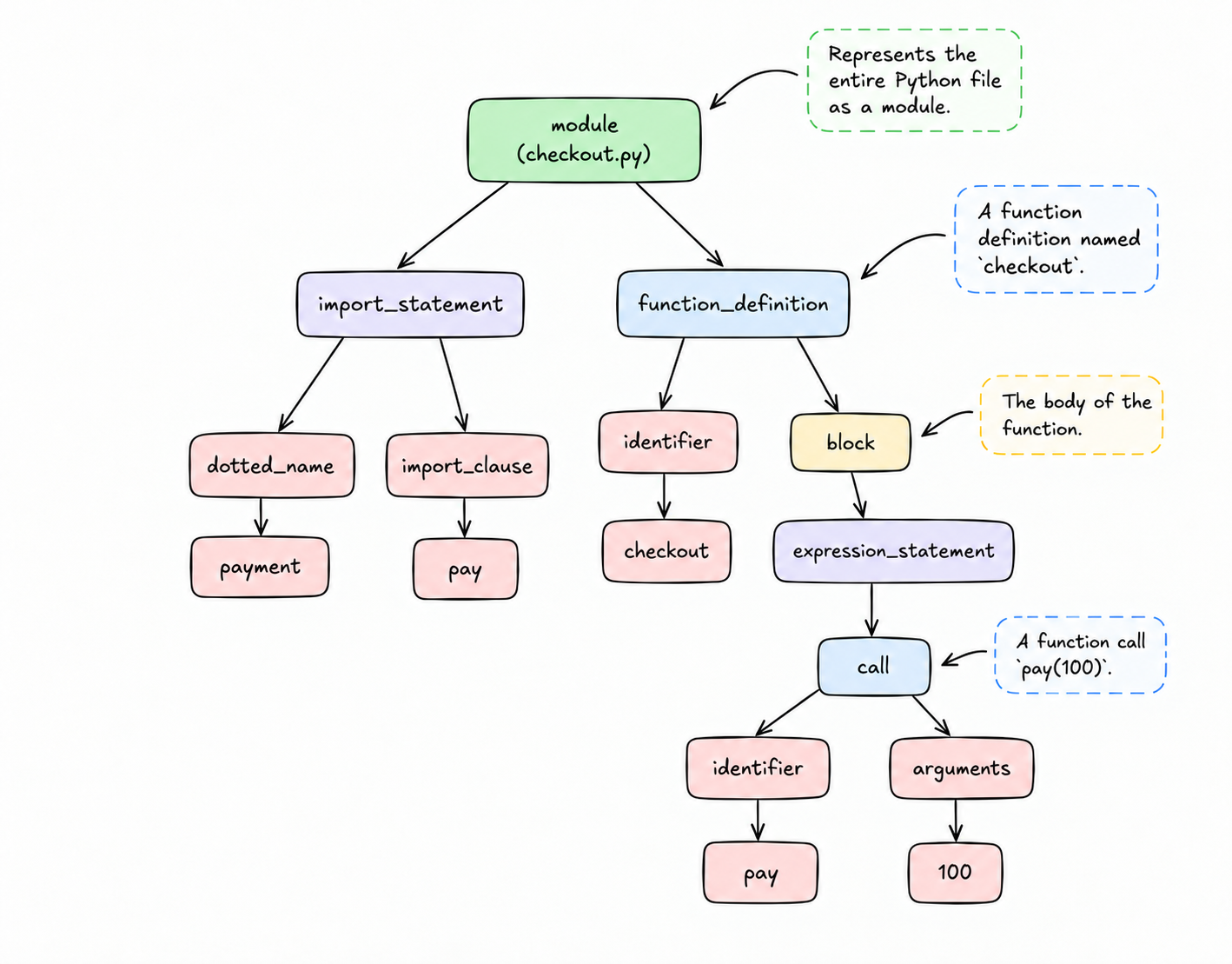
Tree-sitter realizes that pay(100) is a function call, but it doesn't automatically know which pay() function that name refers to.
There could be ten different functions named pay across your repository. This leads us to the second key component — SCIP.
3. Source Code Intelligence Protocol (SCIP)
Source Code Intelligence Protocol, or SCIP for short, is the standard format used for storing information about code symbols and references.
A semantic indexer analyzes the code and produces SCIP information that CodeGraph can use.
Using File 2 as an example:
Tree-sitter identifies that there's a call to pay.
SCIP can tell us that this reference points to the pay function defined in payment.py.
The diagram below should help you understand the use of SCIP.
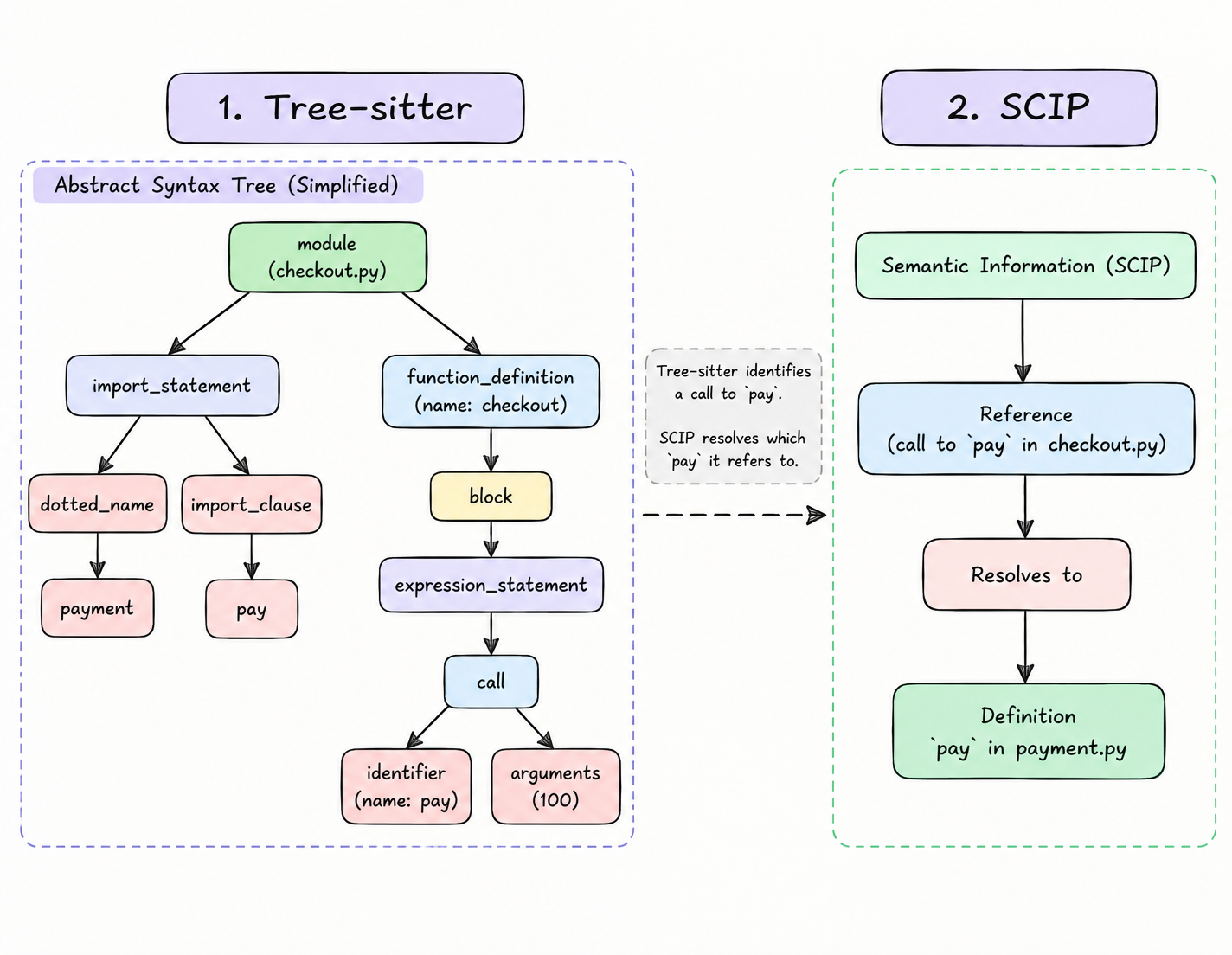
In short, Tree-sitter is used to identify pieces of Python code and their structure, while SCIP carries information that helps identify which actual functions, classes, or variables those references point to.
4. Graph Builder and FalkorDB
This stores all the relationships built by Tree-sitter and SCIP into FalkorDB, a graph database.
Here, the nodes represent modules, classes, functions, methods, and other code entities, while the edges represent relationships such as defines, calls, imports, and other relationships supported by the extraction pipeline.
For each relationship it builds, it needs to know:
| Information | Example |
|---|---|
| Source | checkout() |
| Relationship | Calls |
| Target | pay() |
| Evidence | checkout.py:4 |
| Version | Repository + Git commit |
CodeGraph gives entities identities tied to their repository, commit, and names so that two different functions with the same name cannot be confused with one another.
FalkorDB stores the connections between them, making it useful for traversing chains of relationships.
For example, a graph query can conceptually ask:
"Starting from checkout(), follow call relationships up to three steps and return the functions reached."
FalkorDB is especially important here because following relationships is the primary operation, rather than merely searching for words in files.
5. Provenance
One of the things I wanted to make sure of was that CodeGraph doesn't simply show relationships and expect developers to blindly trust them.
This is where provenance comes in.
In simple words, provenance means keeping track of where a particular piece of information came from.
For example, let's go back to our earlier example involving checkout() and pay().
If CodeGraph tells us that checkout() calls pay(), it should also be able to tell us where it found that relationship.
This could include the source file, the line where the function call occurs, and the exact Git commit that was analyzed.
So rather than just showing:
checkout() → calls → pay()
CodeGraph can also provide the source evidence supporting that connection.
Another important thing is that not every relationship can be identified with complete certainty.
Sometimes, CodeGraph can identify the exact function being called. Other times, there might be multiple possible targets, or it might not be able to resolve the target at all.
Instead of treating all these cases as equally certain, CodeGraph keeps track of these differences.
After all, there's not much point in building a graph of code relationships if you can't explain where those relationships actually came from.
6. Vector Retrieval
If a repository has 1,000 functions and you want to find out which function handles user authentication, vector retrieval comes in handy, as rather than simple keyword matching, it works by checking the meaning of your question against the indexed code.
The important distinction is:
Vector retrieval: Helps locate which code might be relevant.
FalkorDB: Shows how that code is actually connected.
Vector retrieval cannot prove that two functions call each other.
Another important thing to note is that vector retrieval is not ALWAYS needed. A precise question naming two known functions can go straight to symbol lookup (Tree-sitter + SCIP) and graph traversal.
7. Frontend
Now that we've gone through how the relationships are identified and stored, we need a way for developers to actually interact with them.
This is where the frontend comes in.
Rather than expecting developers to write graph queries themselves, CodeGraph provides an interface where they can explore the repository and ask questions in plain English.
There are mainly four parts to the interface:
Investigate: Ask questions about the repository and explore the answers along with their supporting evidence.
Explore Graph: Visually explore functions, classes, and their connections. You can also select relationships to inspect them in more detail.
Changes & Tests: Compare Git commits, investigate potentially affected code, and explore relevant test information.
History: Revisit previous investigations without having to start from scratch.
One of the things I wanted to focus on was making the graph easy to understand, even for someone who isn't familiar with graph databases.
The idea is fairly simple: you shouldn't have to understand how FalkorDB works internally just to figure out how two functions in your codebase are connected.
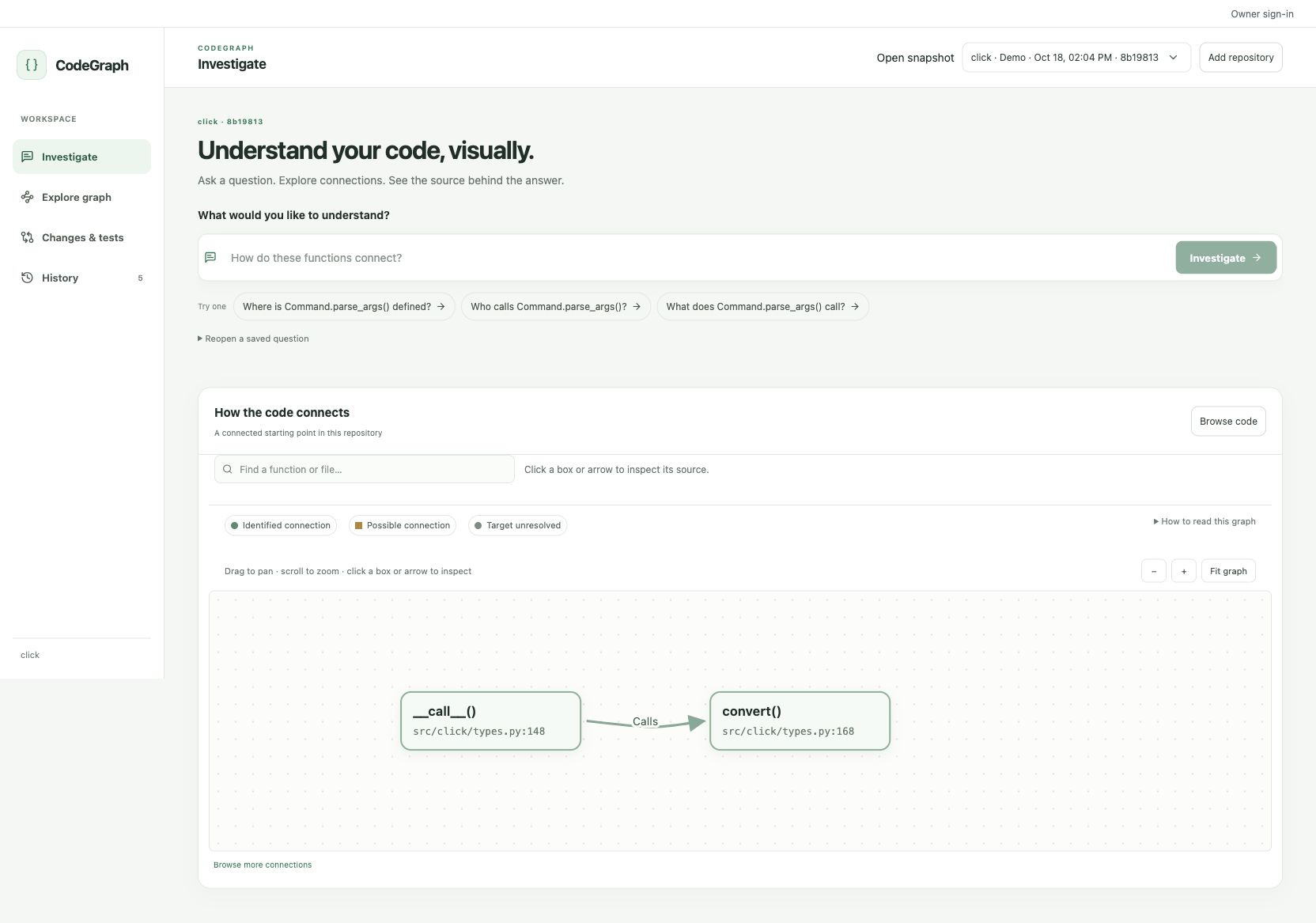
CodeGraph in Action
Now that we've gone through the architecture, let's actually see how all these components come together.
For this, I decided to use Click, an open-source Python library used for building command-line interfaces.
Once the repository is ingested, CodeGraph analyzes the Python files, identifies relationships, and stores them in FalkorDB.
From here, I can ask questions about the codebase in plain English, and CodeGraph will try to find the relevant relationships.
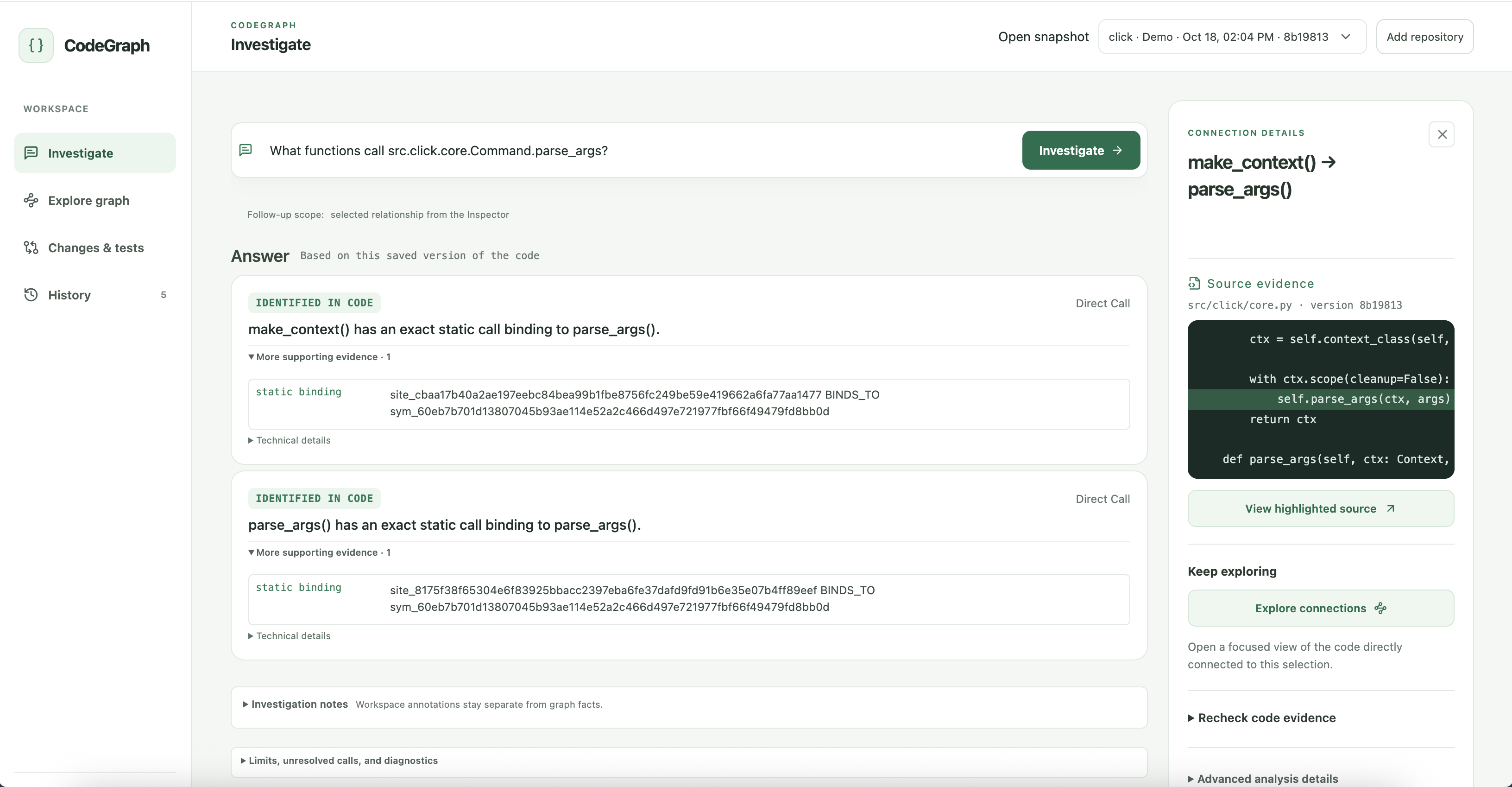
One thing I wanted to make sure of was that CodeGraph doesn't simply give an answer and expect the developer to trust it.
You can click on a connection in the graph and inspect the source code supporting it.
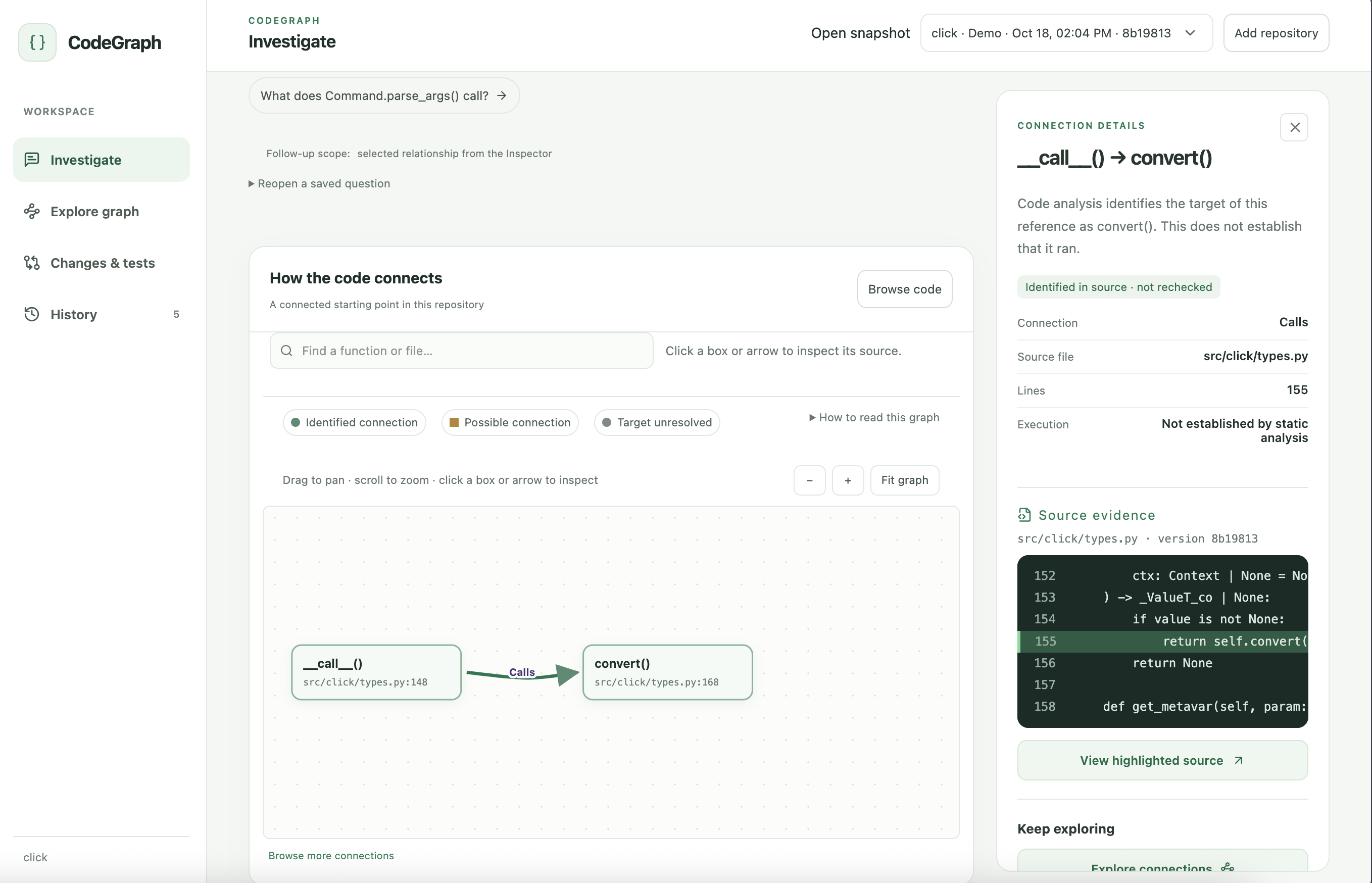
This was one of the main things I wanted to achieve with CodeGraph: rather than blindly trusting an answer, developers should be able to see where the information actually came from.
Git Changes & Impact Analysis
I wanted the ability to understand how changes to one part of a codebase might affect other parts.
For example, let's say you modify a function that's being called by several other functions. How would you know which parts of the codebase might be affected?
CodeGraph allows you to compare two Git commits and investigate the relationships surrounding the changed code.
Rather than just showing which lines were added or removed, it uses the graph to identify potentially affected functions and their connections.
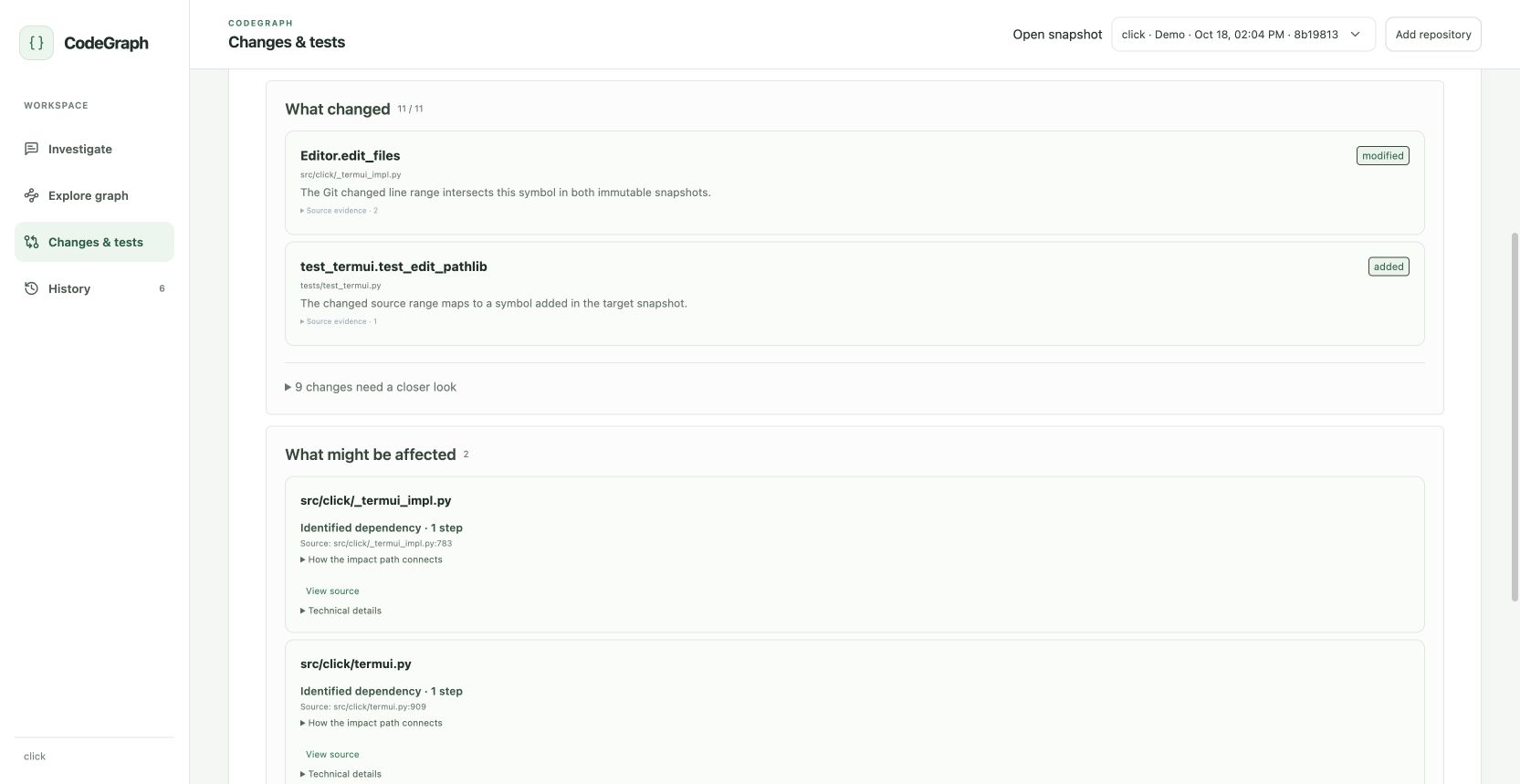
Of course, this doesn't necessarily mean every connected function will break. It simply helps narrow down where a developer might want to investigate further
Limitations and Architectural Hurdles
While the architecture seems fairly straightforward, there were A LOT of hurdles that were fairly difficult to overcome.
I had to make sure the system didn't allow users to ask generic and vague questions ("What day is it today?"). It should allow you to ask questions only based on the repository you ingested.
For now, it only works for Python. This is a fairly big drawback in my eyes, but this choice was made because semantic resolution is language-specific. Resolving Python imports and methods is different from resolving Java or C++ code.
Just because a function or method exists in code doesn't mean it always runs during runtime (static analysis ≠ runtime execution). This is something that hasn't really been explored much due to limited time.
Python allows programs to change certain things while they're running.
For example:
class Email: def send(self): print("Sending email") class SMS: def send(self): print("Sending SMS") def notify(service): service.send()service.send()could refer to eitherEmail.send()orSMS.send()depending on the object passed tonotify(). A sophisticated analyzer might be able to recognize both, but it cannot always claim that one is always called.This is another fairly big limitation.
Apart from these, there are a lot of other issues that could probably be more polished, like UI, performance, and much more, but certain decisions had to be made due to time restrictions.
What I Learned Building with FalkorDB
One of the biggest things I learned while building CodeGraph was how useful graph databases can be when dealing with information that's heavily interconnected.
Initially, it's easy to think of a codebase as just a collection of files, functions, and classes. But once you start looking at how these components interact with one another, representing them as a graph starts making a lot more sense.
FalkorDB made it possible to store these relationships and traverse connections between different parts of the codebase.
However, one thing I quickly realized was that building the graph itself wasn't the hardest part.
Making sure the relationships were actually correct was just as important.
After all, there's not much point in showing developers a graph if the connections themselves are inaccurate.
This was one of my biggest takeaways from the project: building something that gives an answer is one thing, but building something that can explain why it gave that answer is a completely different challenge.
Overall, working with FalkorDB gave me a much better understanding of graph databases and how they can be used to solve problems beyond traditional data storage.
Conclusion
Overall, I enjoyed building CodeGraph, and I hope you enjoyed reading this too :)
The code will be open-sourced as soon as the hackathon ends, and I hope you could learn something from this read.
Thanks, and have an amazing day ahead!
Comments
Join the discussionNo comments yet. Be the first to comment.